
Most of us have now used an AI chatbot: you type a question and it writes an answer. The newer idea doing the rounds is "agentic AI", where the AI does not just answer but goes and does things on your behalf. Suppliers are very keen to sell it. Some of it is genuinely useful, some is hype, and all of it needs thought before you let it near your customers or your data.
As a solution architect, my job is to separate the useful from the risky and help businesses adopt new technology without creating new problems. This article explains what AI agents are, how they work, where they make sense for a small business, and how to start safely.
A quick note on "SI"
You may see agentic AI described as "agentic SI". In September 2026, a US executive order directed US federal agencies to use "Super Intelligence" (SI) in place of "artificial intelligence" (AI), and some vendors and publications have followed suit. It is a change of name rather than a change of technology: the order defines SI as the same technologies already covered by the existing US legal definition of AI. In the UK, "AI" is still the usual term, so that is what I use here.
Chatbot or agent: what is the difference?
A chatbot responds. You ask, it answers, and then it waits. It might draft an email, but you copy, check and send it.
An AI agent works towards a goal. You give it an objective, such as "find a time next week for a call with this client and send them an invite", and it works out the steps, uses the tools it has been given access to (your calendar, your email), checks the results and keeps going until the job is done or it needs your help.
A useful way to think about it: a chatbot is a knowledgeable colleague you can ask questions. An agent is closer to a new assistant you have given a task, a set of keys and some instructions. That is exactly why agents can be more useful, and why they need more care.
How agents work: goal, tools, memory, loop
Under the bonnet, most agents follow the same basic pattern:
- Goal. A person sets the objective and the boundaries: what to achieve, and what not to do.
- Tools. The agent is connected to specific systems it is allowed to use, for example reading a shared inbox, checking a calendar, looking up a customer record or creating a draft invoice. It can only act through the tools it has been given.
- Memory. It keeps track of what it has done so far and any context it needs, such as the customer's previous emails or your business rules.
- Loop. It plans a step, takes it, looks at the result, and decides what to do next, repeating until the goal is met. Well-designed agents pause and ask a person before anything risky.
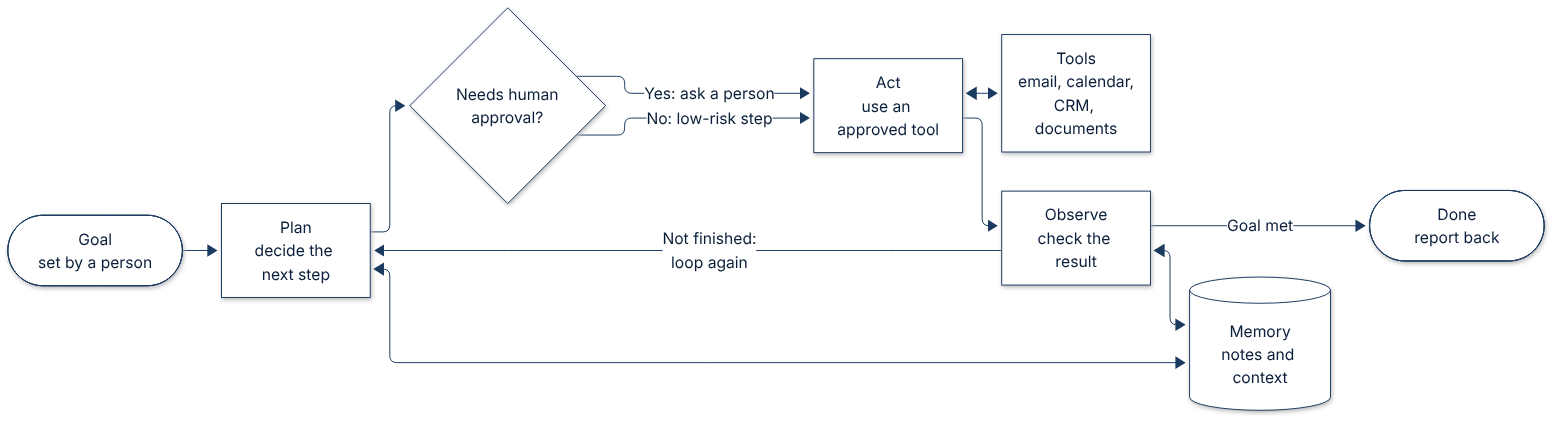
The important point for business owners is that an agent's power comes entirely from the tools and permissions you give it. Get those right and most of the risk is manageable.
Practical uses for a small business
The best early uses are repetitive, rules-based tasks where a mistake is easy to spot and cheap to fix:
- Enquiry triage. Reading incoming website enquiries, sorting them by type, pulling out key details and drafting a reply for you to approve.
- Scheduling. Finding suitable meeting slots and preparing invitations.
- Admin and paperwork. Matching supplier invoices to orders, chasing missing information, or preparing summaries for your bookkeeper.
- Internal knowledge. Answering staff questions from your own policies and procedures, with links to the source document.
- Research and preparation. Gathering background on a prospect or tender and producing a briefing note.
Notice that most of these produce a draft or a suggestion rather than a final action. That is deliberate.
Risks and the guardrails that matter
Human approval. Decide which actions an agent may take on its own and which need a person to say yes. Sending anything to a customer, paying anything, deleting anything or changing records should normally need approval, at least to begin with.
Permissions. Give the agent the least access it needs: read-only where possible, a single shared mailbox rather than everyone's, one folder rather than the whole drive. Use a separate account for the agent so its actions are clearly logged and can be switched off.
Data protection and UK GDPR. If an agent handles personal data, the usual rules apply. Know what data it can see, where that data is processed and stored, and what your AI provider does with it. Check the provider's terms on retention and use for training. UK GDPR also has specific rules on solely automated decisions that have legal or similarly significant effects on people, so keep a person involved in decisions such as hiring, credit or refunds. For anything higher risk, a data protection impact assessment is sensible, and the ICO publishes guidance on AI and data protection.
Mistakes and manipulation. AI models can be confidently wrong. Agents that read emails or web pages can also be fed instructions hidden in that content, a problem known as prompt injection. This is another reason to limit tools and require approval for anything consequential.
Cost. Agents typically use far more AI processing than a single chatbot question, because each task involves many steps. Most services charge by usage, so set spending limits and monitor bills, especially early on.
How to start small
- Pick one task. Choose something frequent, tedious and low-risk.
- Write down the current process. If you cannot describe the steps and rules, an agent will not follow them reliably either.
- Start in "draft only" mode. Let the agent prepare, and a person approve and send.
- Limit access. Connect only the tools and data that task needs.
- Review regularly. Check its work, track time saved and costs, and only widen its permissions once it has earned trust.
Often the right answer turns out to be simpler than an agent: a well-designed form, a standard automation or a small piece of code. That is a perfectly good outcome.
Checklist: is your business ready?
If you ticked most of these, you are in a good position to try a small, well-guarded pilot. If not, a little groundwork first will make any AI project far more likely to succeed.
Want a second opinion?
Whether you are being pitched an AI product, wondering where agents could save your team time, or want to check that something already in use is safe and sensible, an independent review can help.
Quorum Digital offers practical architecture and AI reviews for small businesses: what is worth doing, what to avoid, which guardrails you need and what it is likely to cost to run. Plain English, no hype. If that would be useful, get in touch for a short, informal chat.
Or start with the free AI-readiness check.